


If Instagram suspends an account assigned to a campaign, or asks for a verification that only the creator can complete, such as a video selfie, you can ask the creator for help with a ticket from Tikful Studio. The ticket gives the creator the details needed to sign in to the account and resolve the issue.
When to use the ticket
Use it only for issues that need the creator to step in directly:
- Instagram has suspended the account and, to restore it, asks to confirm the identity of the person who appears in it.
- Instagram asks for a video selfie or another identity check.
- Any other security step that requires the creator to sign in to the account.
For questions about the platform, campaigns or payments, write to the team through the contact page.
A ticket is no substitute for following the rules
If Instagram reviews or suspends an account often, the problem is usually how it’s being used. Check its Instagram Account Status and go over the guide on starting a new Instagram account.
How to open the ticket, step by step
- In Tikful Studio, open «Métricas por campaña» (Metrics by campaign) and find the account that has the problem.
- Select Ayuda (Help) in the Acciones (Actions) column. The «Ticket de soporte para la modelo» (support ticket for the creator) form opens.
- Check that the username under «Cuenta seleccionada» (Selected account) is the one for the affected account.
- Under Cuenta Instagram (Instagram account), enter the email address the account was registered with and its current password.
- Under Cuenta email asociada (Linked email account), enter that email address and its password. The creator needs them because Instagram may send a confirmation code to that inbox at sign-in.
- If the account has two-factor authentication turned on, add a backup code in Código de respaldo Instagram (Instagram backup code). The guide on what an Instagram backup code is explains how to get one.
- Select Enviar ticket a la modelo (Send ticket to the creator).
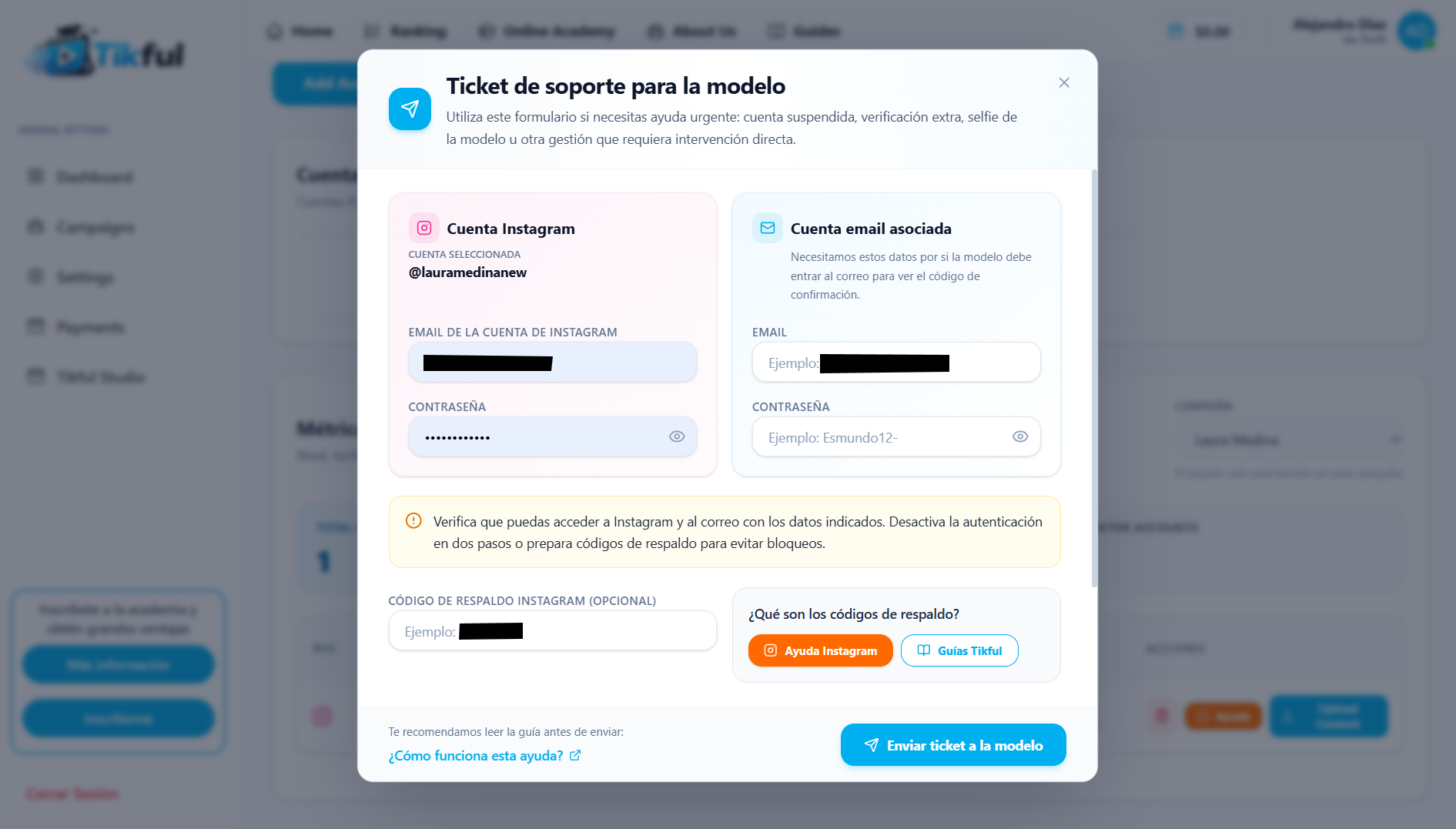
Before you send it
- Check that you can sign in to Instagram and to the email account with the details you’re about to send.
- Keep two-factor authentication turned on and have a backup code ready. The form also accepts accounts with two-factor authentication turned off, but keeping it on with a backup code is the safer option.
- For these accounts, use an email address and passwords of their own, separate from the ones for your personal accounts.
Protect your login details
Share passwords only in the ticket form, never by direct message, WhatsApp or email. Once the issue is resolved and the ticket is closed, change the Instagram and email passwords and generate new backup codes.
What happens next
The creator signs in to the account and completes whatever Instagram asks for. If it’s a video selfie, the guide on identity verification on Instagram walks you through the process. Instagram may resolve it right away or take a few days to review the case, and its reply goes to the account’s email address. Once everything is resolved, the ticket is closed.