


In Tikful Studio, each Instagram account you link to a campaign has a growth level. It starts at level 1 and moves up as the account gains traffic and engagement. The dashboard shows that level next to the rates and the academy perks that apply to the account.
How an account moves up a level
- Starting point. When you link a new Instagram account to a campaign, it starts at level 1.
- How it moves up. The level rises as the account gets more traffic and engagement on what you post.
- What it gives you. Each level comes with its own perks, which you can see in the dashboard next to the account.
The level belongs to each account in each campaign: if you run several accounts, each one moves up on its own.
You keep what you’ve achieved
Moving up a level doesn’t take away anything you had before. What the account achieved at earlier levels stays, and whatever comes with the new level is added on top.
Where to see each account’s level
In Tikful Studio, open «Métricas por campaña» (Metrics by campaign) and choose the campaign from the drop-down menu. The table shows each account with its platform, username, followers and views, its level, its rates for views and per subscriber, and whether it has the Tikful Academy perks.
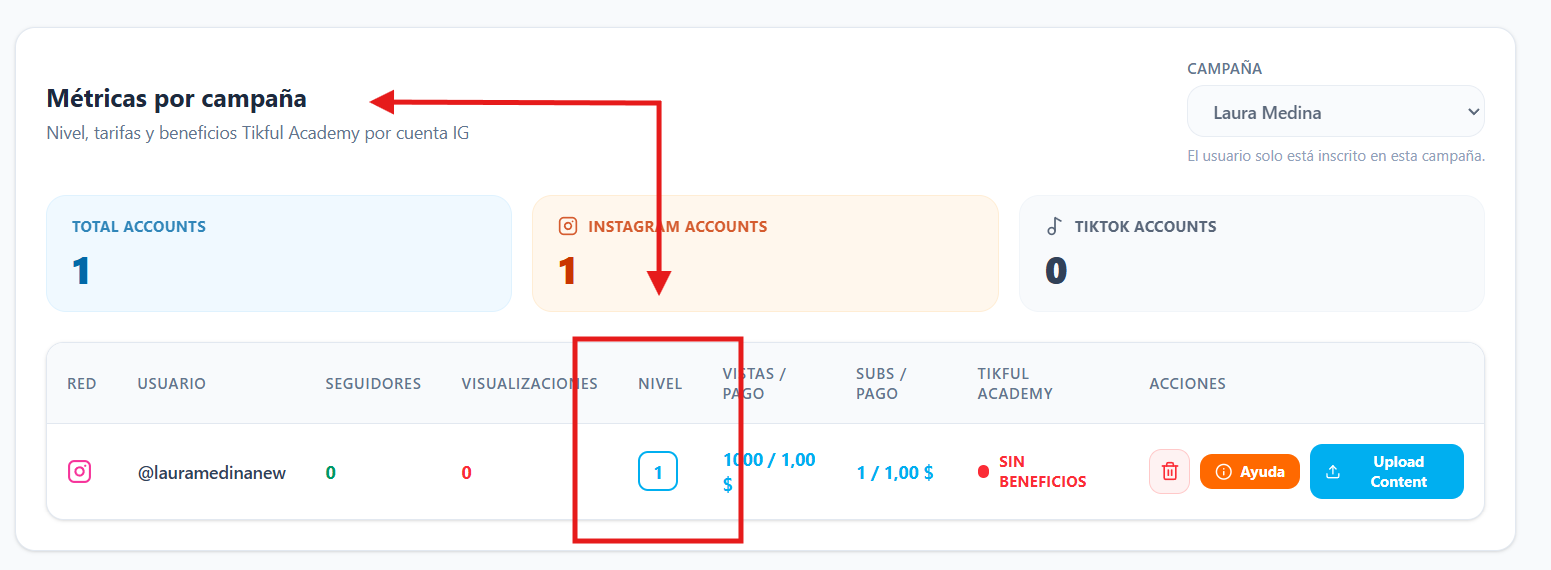
Some features of the level system are still in development, so the dashboard may show more information over time.
If you haven’t linked an account yet, follow the guide on how to assign an account to a campaign in Tikful Studio. And if the Tikful Academy column says «Sin beneficios» (No perks), you can join the academy to improve your terms.